
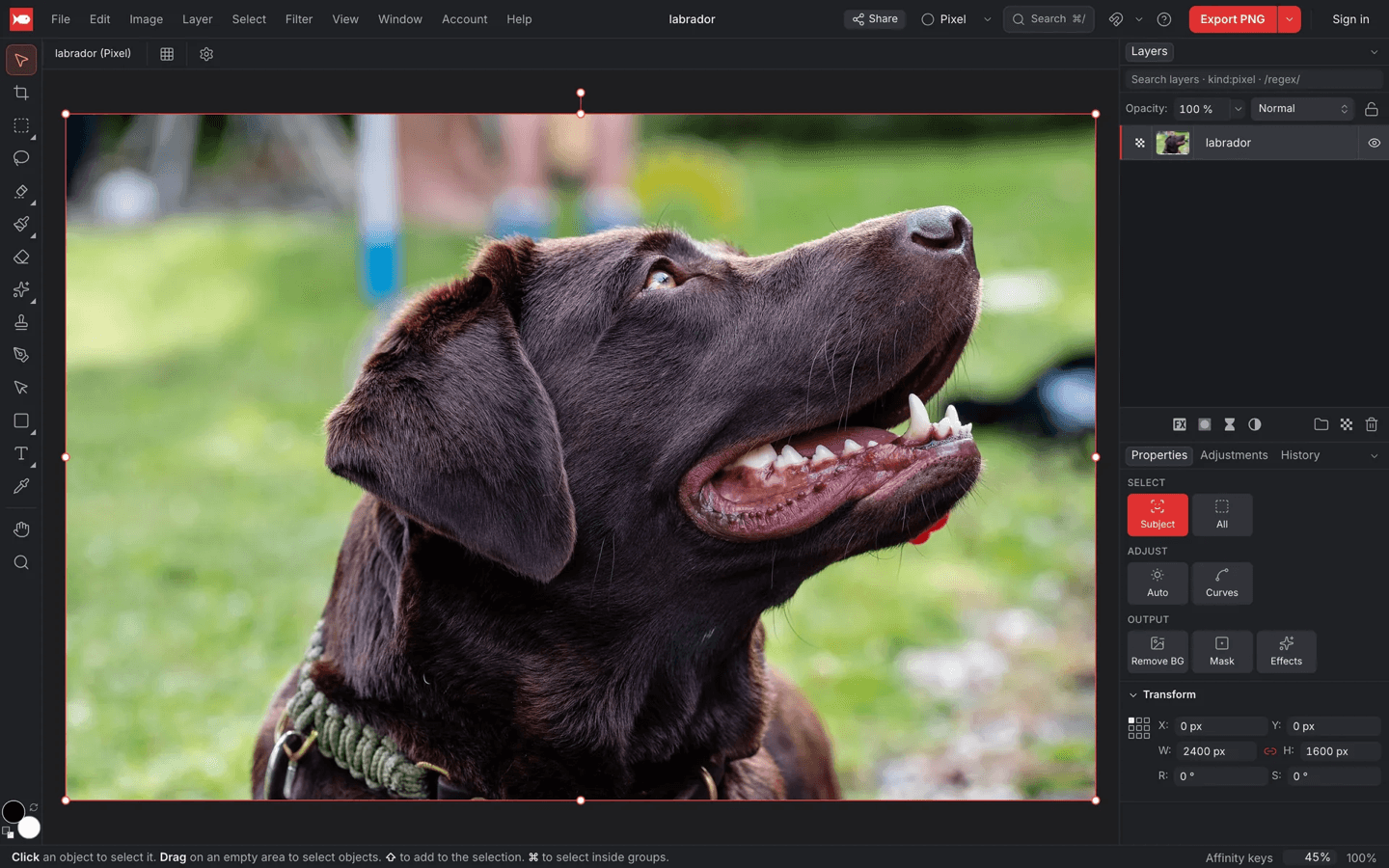
What it is
koi.photo is a photo and vector editor that runs in a browser tab. It is free, has no watermarks and works without an account. The interface follows Affinity Photo, and keyboard shortcut presets for Affinity, Photoshop and Figma let people switch without relearning.
Features include:
- Pixel, vector, text, adjustment and live filter layers, with masks, clipping and all 27 Photoshop blend modes
- Non-destructive adjustments such as Curves, Levels, HSL and Gradient Map
- Healing brush, clone brush, content-aware fill and Liquify
- Select Subject and Remove Background, computed on your device
- PSD import and export with layers, masks and editable text, plus a 16-bit Develop workspace for camera RAW files
- An installable app that works offline and supports Apple Pencil
An optional free account adds 1 GB of cloud storage, version history, share links and real-time collaboration with live cursors.
How it works
The core rule of the architecture is that the main thread never touches pixels. React renders only the interface. A render worker owns the GPU through an OffscreenCanvas, a pool of compute workers handles file formats and filters, and a separate worker reads and writes the browser’s private file system.
Rendering uses WebGPU, with WebGL2 as a fallback. Both backends run the same compositing shaders, so they produce identical pixels. Every layer is split into 256 × 256 pixel tiles, and only tiles that are visible and changed get redrawn. In a stress test, 50 layers of 8K images composited at 3 ms per frame on an M4 Pro.
The document is a Loro CRDT, a data structure designed for merging concurrent edits. Pixels are stored outside it: each layer maps tile coordinates to a SHA-256 hash, and the tile data lives in a content-addressed store. This one model provides undo, crash-safe autosave, the .koi file format and live collaboration.
Heavy work that usually needs a server runs in the browser instead:
- Background removal runs a 120 MB segmentation model on WebGPU, at about one second per photo
- RAW decoding uses LibRaw compiled to WebAssembly
- Text shaping uses HarfBuzz and vector booleans use CanvasKit
Accounts, storage and collaboration run on a self-hosted Supabase instance on one server in Germany.
Why it exists
koi.photo is meant as a free editor that people used to Affinity Photo can pick up without relearning, and that keeps photos on the device instead of uploading them.
What happened
koi.photo launched in October 2026 after three weeks of development in planned phases, from architecture documents and the editor shell to RAW support and collaboration. Some of the problems along the way:
- On German QWERTZ keyboards, ⌘Z triggered redo because the key code for Z reports Y
- A brush stroke buffer that regrew at its cap briefly pushed Chrome’s GPU process past 14 GB
- The segmentation model had to be patched at download time to fit within the WebGPU limits of onnxruntime-web
Known limits: there is no CMYK, HEIC or TIFF support, no plugin system, and WebGPU works best in Chrome and Edge.